One of the key principles of the General Data Protection Regulation (GDPR) is data minimization.(1) Personal data must not be kept longer than is strictly necessary to accomplish the purpose for which it was collected.(2) That's quite a lot. Look at your own attic or garage: throwing stuff away is not in our nature.
coauthor: Muller, Peter (e-Tomic)
"Who knows, maybe I'll need it again" and "cleaning up is boring." You can already hear yourself and your children saying it. The same is true for businesses and certainly for IT professionals. Companies are focused on being able to account for things. For reports, an audit or for a lawsuit. With systems, it's no different. IT professionals are focused on being able to reproduce a situation, and above all, not lose any data.
So the AVG calls for an opposite movement: systematically discarding data. Throwing away is one thing, doing it in a systematic way is another. The latter is vital, because throwing away too much personal data qualifies as a "data breach"; also an offense under the AVG.
Designing a "system" for discarding data consists of three steps:
Retention periods. Determine how long, what personal data should be kept.
Data inventory. Inventory what personal data is kept where and for what purpose.
IT and processes. Implement functionality, tools, processes and procedures to erase or anonymize personal data in a timely manner.
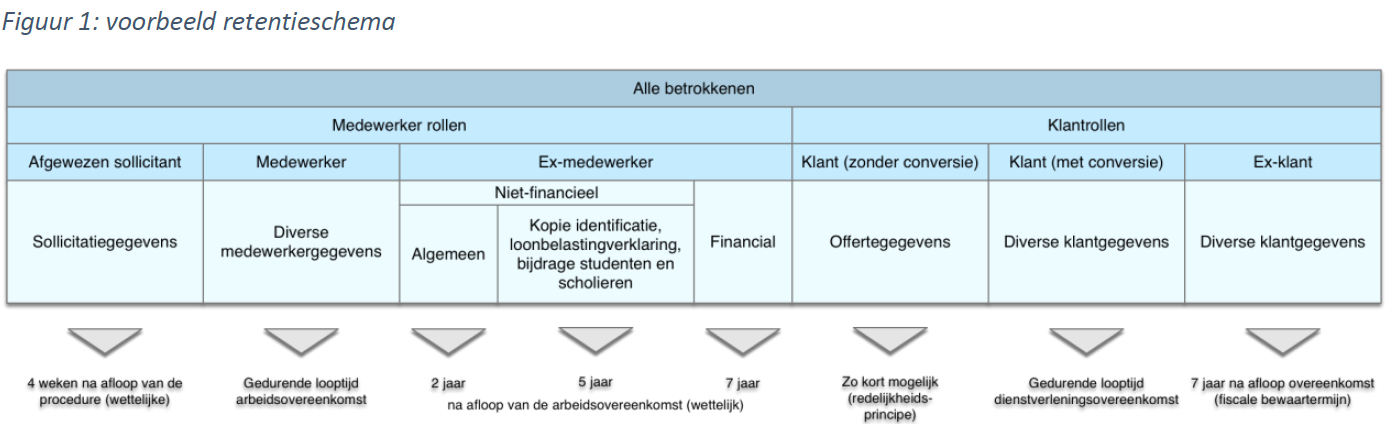
No longer than strictly necessary. That is the criterion. But what does this mean concretely? There are a few basic principles that can help in drawing up a so-called "retention schedule" (see Figure 1). The starting point is that the necessity criterion can largely be traced back to the legal basis for collecting data. The main bases are:
meeting legal obligations;
entering into and performing a contract; and
consent of the data subject (employee or customer).
By setting the retention period for certain categories of data to the statutory minimum or maximum retention period (for example, the seven-year tax retention period for financial data), an important part of the retention schedule can be completed.
The retention period is related to the role of the data subject (the natural person whose information is processed). As a rule, every company deals with two categories of data subjects: employees and customers. Customers come in two forms: consumers and companies. The latter does not involve personal information, unless the legal form is a sole proprietorship.
Employees and customers can again be further subdivided depending on their role. Different retention periods apply to the personal data of job applicants, employees and former employees. The same applies to prospective clients, customers and former customers. As long as there is an employment or service agreement (c.q. subscription or membership), there are grounds for retaining (almost all) data, such as old orders, mutations in customer data, etc. After all, it is also in the customer's interest to have a total 'customer picture'.
As long as you have consent from the data subject, you may process the data and thus retain it. This is and remains a shaky basis. After all, consent can also be withdrawn and then the basis for processing falls away. In addition, under the AVG, data subjects have a number of rights (such as the right to oblivion) that can shorten the retention period.
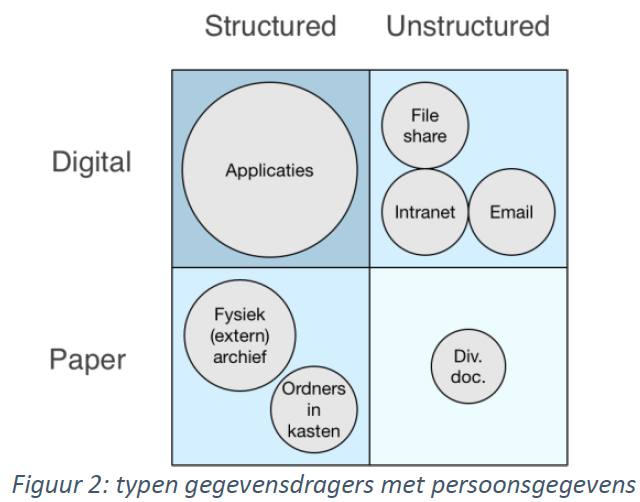
What's in the attic? This is a monstrous task. Especially given the variety of data carriers. These can be classified along the following two dimensions (see Figure 2):
Structured versus unstructured.
Digital versus physical.
(Click image for larger size)
In the upper left quadrant are applications that support core business processes: front- mid- and back-office systems, CRM, output management and more. Most of these applications have a database, which stores data in structured, searchable records. Of concern is the presence of user databases or log files containing personal data. Another concern is data exchange between applications through "intermediate files" that are often permanently stored on the file share.
In the upper right quadrant are applications and systems with unstructured data: Document Management system, file share, intranet and email. Side note here is that although the Document Management system contains unstructured data (scans, PDF, Word documents, etc.), it is indexed and thus searchable. Unstructured data is difficult to clean. There is no magic button in Outlook or File Manager that will clean all emails or documents from client x.
In the lower left quadrant are the physical archives (in boxes or binders) with, if you are lucky, an index of the contents. Cleaning individual (customer) files in these archives is very laborious: periodically retrieving and going through all the boxes or binders, filtering and discarding what should go away, putting back what should be retained, etc. A labor-intensive and nearly impossible task. It often turns out that boxes in an (external) archive do not have sufficient characteristics to retrieve data. This makes it impossible to meet retention deadlines.
In the lower right quadrant is an amalgam of documents in desk drawers, stacks in closets, etc. Perhaps the easiest category: do nothing with them or throw them away integrally.
There are several ways to clean up the attic. Some are more systematic and structural than others. The approach below assumes a fundamental approach in which the cleaning or anonymization is automatic as much as possible.
The approach consists of the following components:
Development of cleaning or anonymization functionality.
Digitization and destruction of physical archives.
Reorganization and automatic scanning of the file share and intranet.
Automatic cleaning of emails containing personal data.
Developing solid functionality is easier said than done. Most organizations have multiple (core) applications that together form 'chains' in which (personal) data are processed.
Applications must be considered in context. It makes no sense to anonymize personal data if it is reset overnight thanks to synchronization with another application. Or if anonymization results in a failure because the data no longer meet the validation rules set by the technical interface with another application.
When developing cleaning or anonymization functionality, three concerns are important:
Data selection verification and validation.
Role and/or status-dependent retention periods.
Uniform anonymization strategy.
Gone is gone! De-identification of personal data is irreversible. That's pretty exciting. Especially when it involves business-critical customer data. How do you know if you are not throwing away too much (or too little)? The answer to this question is a procedure with checks and balances. Records to be de-identified are automatically selected. Selection functionality is included in the regression test of future releases.
The selection is checked manually and visually according to the four-eye principle, where records can also be excluded (e.g. in case of a legal dispute). This check is done using a plausibility report that indicates how many records should normally be cleaned. This report comes about by another route and "triangulates" the outcome.
The retention period of personal data in many cases depends on the role of the data subject. Or rather, depending on when the role of the data subject has changed (e.g., when an employee left employment).
This means that applications that contain personal data, but do not know when the role change occurred and are not synchronized with an application that does "know," cannot independently clean or anonymize this data. These applications should receive a signal from the core system that does know the status.
Discarding or anonymizing relationship records has the same effect: data are irreversibly de-identified. In general, anonymization is preferable. Anonymized data can still be used for analysis purposes, and deletion of relationship records can lead to a corrupt database.
However, anonymization only works if all applications use the same strategy. If one application retains zip code and the other retains date of birth, the individual can still be identified by linking the two records together via a key (e.g., relationship or contract number). This is essentially pseudonymization, rather than anonymization.
Thus, the choice of a unified anonymization strategy is important. It is recommended to choose the strategy in such a way that it can also be used to pseudonymize development and test environments. IT employees will then no longer have insight into personal data (another requirement under the AVG).
It sounds contradictory: in order to clean personal data, it must first be digitized and centralized. Digitization is needed to automatically discard documents and centralization is important to efficiently set up the cleansing based on a signal function from the back office or CRM application.
Digitization and centralization require the implementation of a Document Management system combined with a "scanning street. This is a project in itself and it would go too far to describe here what is involved. What is certain is that there are a lot of choices to be made. Scan current physical archives or let them 'walk out'? Shielding 'dead archives' via Compliance Manager? All choices that must be carefully made and documented.
This article can also be found in the Accountability file
More articles from PrivacyTeam